WeighIt: the weigh-based liquor stock take app for faster stock takes
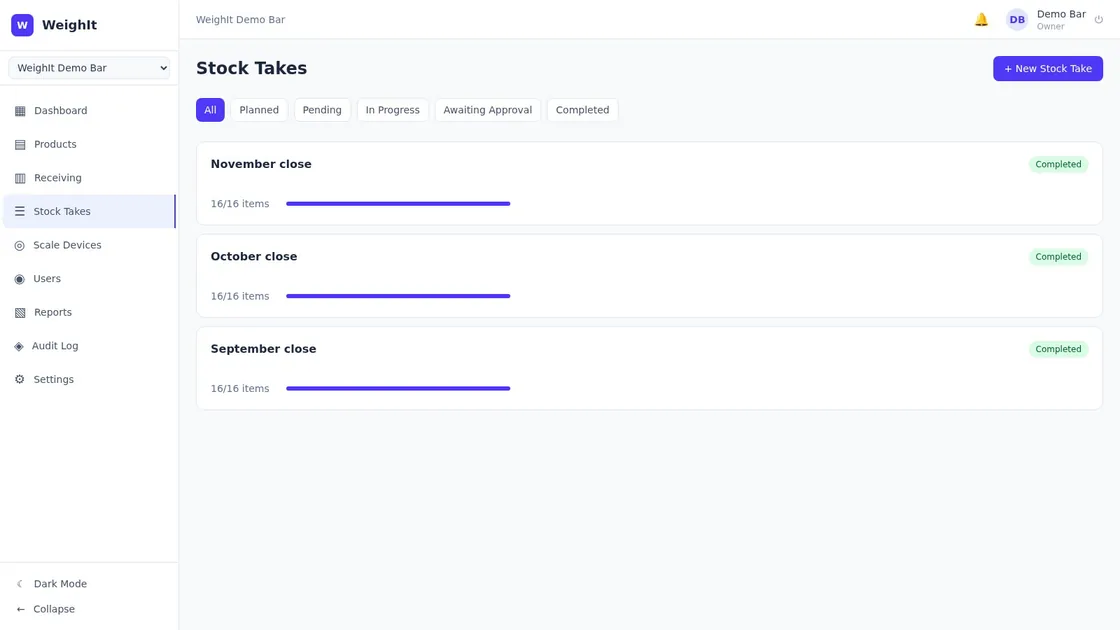
Bars, restaurants and hotel bars use WeighIt to stop guessing bottle levels. Put an open bottle on the Bluetooth scale and the app shows what is left, in tots. A manager approves the count in the web portal and sees which products came up short.
- Bluetooth scale included in the setup
- iPhone, Android and web
- South Africa, Namibia and Zimbabwe
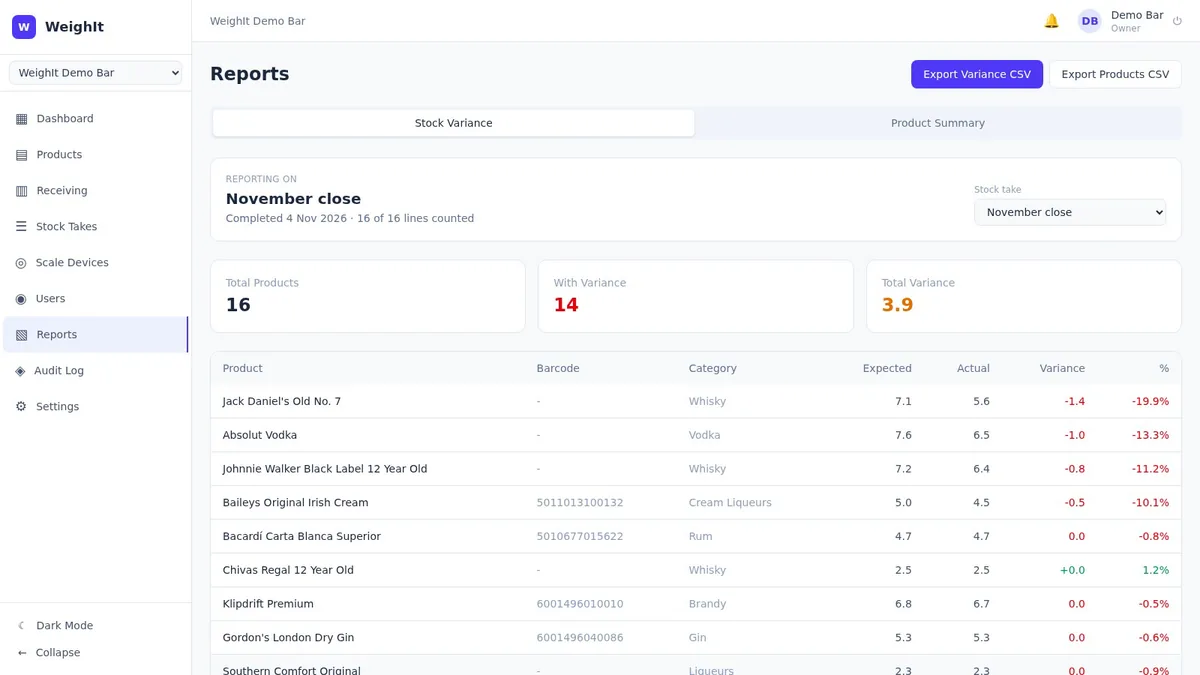
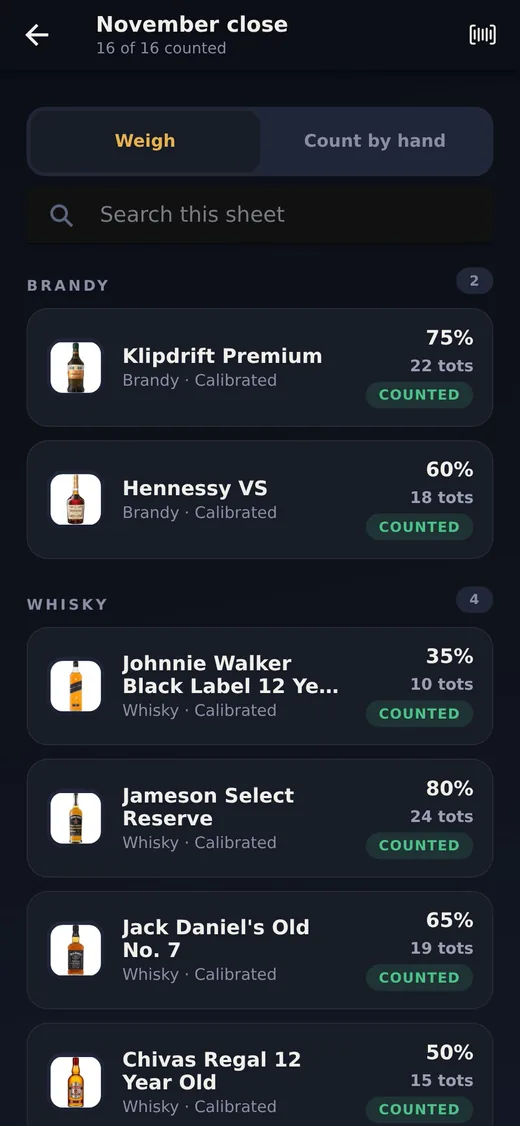
Built for hospitality teams that count stock often
WeighIt is for operators who need faster, repeatable liquor stock takes across busy venues and changing shifts.
Cocktail bars and pubs
Weigh the open bottles after a busy service and see the variance shift by shift, not only at month end.
Restaurants and hotel bars
Run the same count in every outlet, with every team and every period. Nobody has to judge a bottle level by eye.
Owners and area managers
Compare venues, catch shrinkage early and order from what was actually counted on the shelf.
Everything you need to count liquor stock
A Bluetooth scale and a phone app for the person counting, and a web portal for the manager who signs it off.
Your products, loaded and calibrated for you
As part of the setup we load your product list from your spreadsheet. Each product is calibrated once with its full and empty bottle weight, and every count after that uses it. A new product needs one full and one empty bottle on the scale.
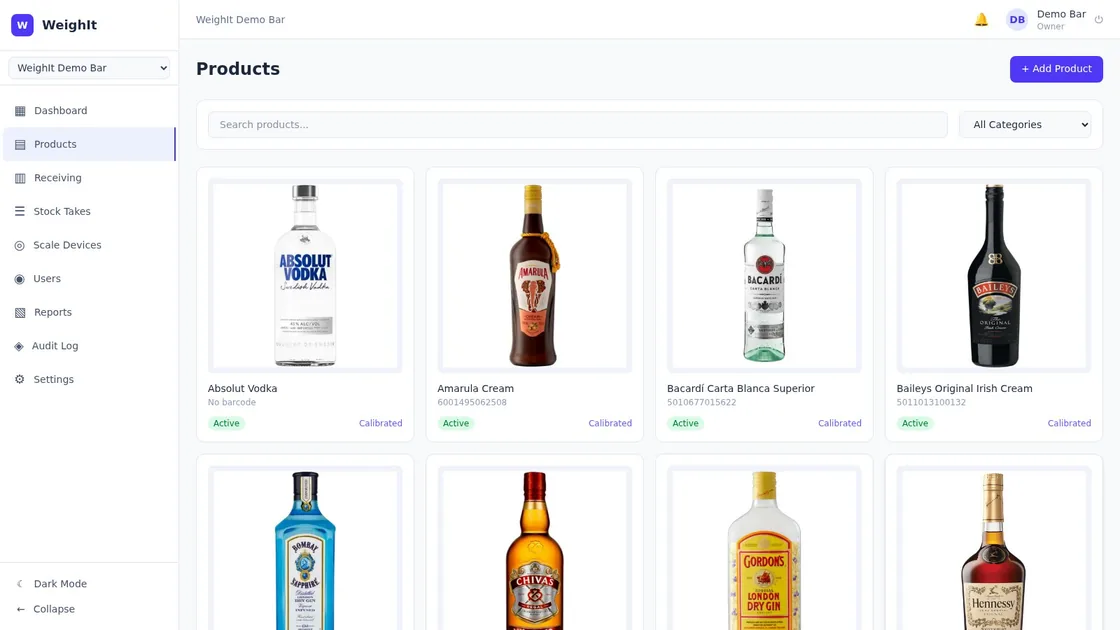
- Find a bottle by name or scan its barcode
- Products grouped by category, as they sit on your shelves
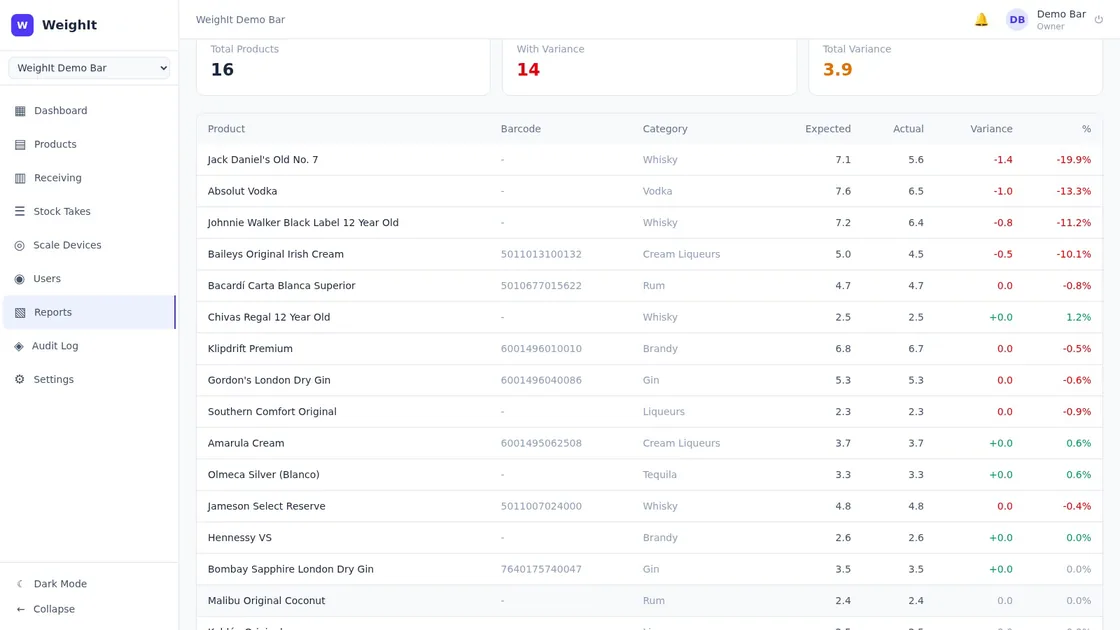
A variance report, product by product
When a count is approved, the report sets the stock you should have against what was weighed and counted. Shortfalls are listed per product, in bottles and as a percentage, so you know which bottle to look at.
- Export the variance or the product summary to CSV
- Pick any past stock take to report on
Every count on record, from any device
Counts save from the phone to the web portal as staff work, so a manager can follow a stock take from anywhere and approve it when it is done. Every close stays on record, so you can compare one month with the last.
- Counts move from planned to completed with a manager sign-off
- Staff count on the phone, managers set up and approve in the web app
A stock take in three steps
One person, a phone and the scale. No clipboard and no retyping the counts into a spreadsheet afterwards.
-
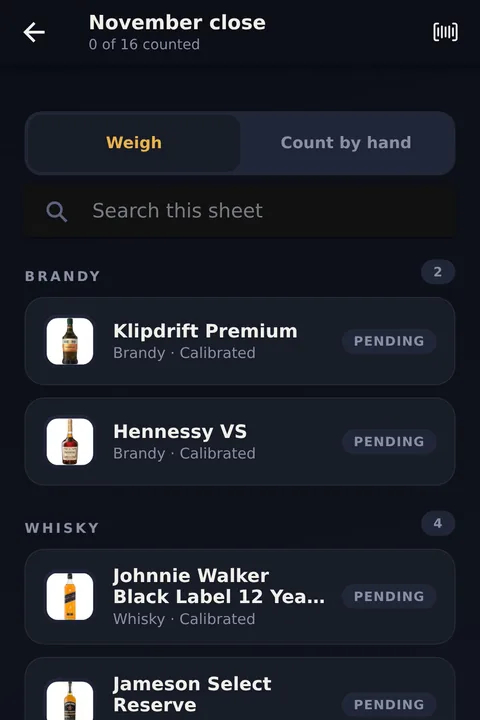
1Connect the scale and open the count
Switch the scale on and the app picks up its reading over Bluetooth. Open this month's sheet: every product you stock is already on it.
-
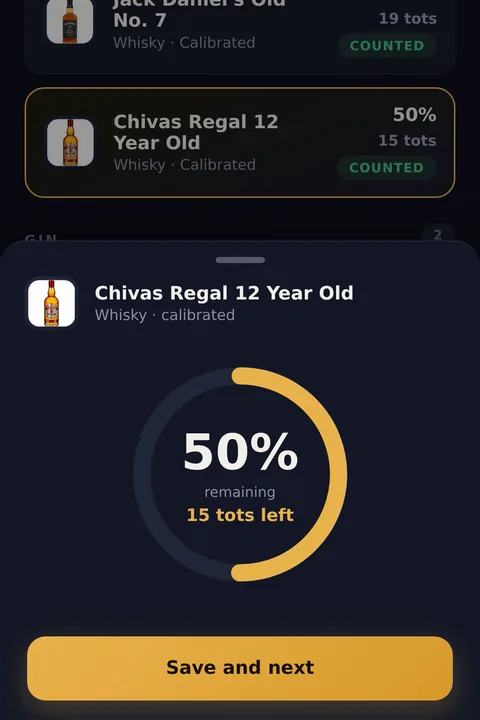
2Weigh each open bottle
Put the bottle on the scale. The app takes off the empty bottle weight and shows the level and the tots left. Tap Save and next, and the next bottle comes up.
-
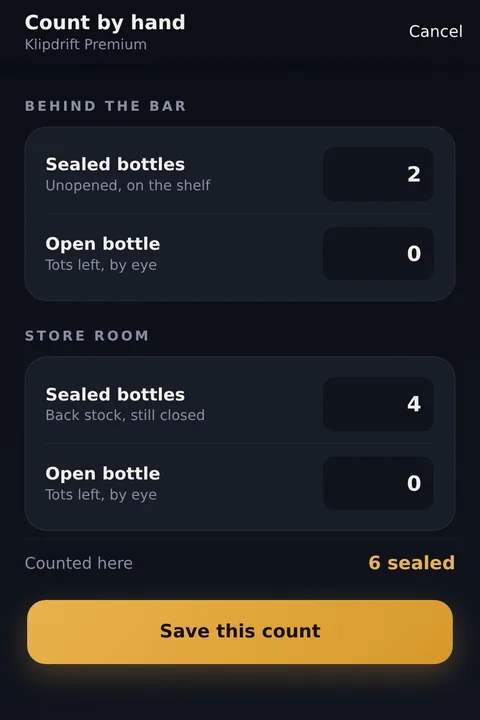
3Count sealed stock and submit
Type in the sealed bottles behind the bar and in the store room. Submit the sheet, and the exact tot counts are in the web portal straight away.
The manager approves the count in the web portal and the variance report is ready to read or export. Every step is in the video tutorials.
What changes when you weigh instead of guess
The same jobs at month end, done by eye and done with WeighIt.
Open bottles
By eyeSomeone judges the level in tenths, and two people judge it differently.
With WeighItThe scale weighs it and the app shows the tots left.
Shrinkage
By eyeA loss shows up at month end, if at all, with no product attached to it.
With WeighItThe variance report lists the shortfall per product, every count.
Time
By eyeA clipboard on the night, then the sheet retyped into a spreadsheet.
With WeighItOne person with a phone. The count is in the web portal when they finish.
Purchasing
By eyeOrders go on feel, so you over-order some lines and run short on others.
With WeighItYou order from what was actually counted on the shelf.
Staff accountability
By eyeHard to say when the stock went missing, so nobody owns it.
With WeighItCount at shift change and a shortfall points to the shift it happened on.
Pricing
Start with a once-off setup: we do all of it for you. Continue monthly only if the numbers earn it. No hidden fees, no long-term contracts.
Founding customer programme now open: pay nothing until your first variance report lands, and keep a reduced founding rate for life.
Setup
We set everything up for you
once-off, per site
Variance Programme
Ongoing monthly leak detection
per site per month
Multi-Site Groups
For restaurant and hotel groups
bundled pricing, on request
Frequently asked questions
Something not covered here? Email info@eyonasoftware.co.za and we will answer it.
What is WeighIt?
WeighIt is bluetooth bar inventory software from Eyona Software Development. Bars, restaurants, and hotels run faster liquor stock takes with bluetooth scale integration, exact bottle and tot counts, and clear shrinkage and variance reporting.
How does WeighIt replace manual stock takes?
Instead of eyeballing bottles, WeighIt pairs with a bluetooth scale. The app takes the weight, subtracts the empty bottle, and calculates the exact remaining volume and tot count. No estimates, no guessing by fractions.
Who is WeighIt for?
Bar managers, hotel F&B managers, restaurant owners, and multi-venue group operators who want accurate liquor cost of sales and tight variance control.
What hardware does WeighIt need?
A compatible bluetooth kitchen or precision scale, plus an Android or iOS device to run the app. Managers use the web dashboard for reporting. Eyona Software Development helps customers pick a supported scale.
What type of scale do I need?
WeighIt works with the Topika Bluetooth kitchen scale, standard off-the-shelf hardware with nothing proprietary. The scale is included and couriered to your site as part of the setup.
How accurate is the tot counting?
The scale weighs the open bottle and the app works out what is left from that bottle's full and empty weights, so you get millilitres and tots instead of a guess by eye. Each bottle is calibrated once, which also takes care of the fact that every spirit weighs differently.
Can I add custom products to the database?
Yes. At setup we load your own product list for you, and you can add any other bottle yourself at any time: weigh it full and empty and enter its basic details.
Can WeighIt integrate with my POS system?
Yes. WeighIt offers free integration to any POS system. Integrations are added based on each client's specific requirements.
How much does WeighIt cost?
WeighIt starts with a once-off setup at ZAR 7,500 per site (we load your products and send the scale), then ZAR 4,000 per site per month for the ongoing variance programme. Multi-venue groups can contact info@eyonasoftware.co.za for bundled pricing.
Is there a contract or commitment?
No long-term contracts are required. The setup is a once-off and the variance programme runs month to month. You can cancel at any time.
How long does implementation take?
Most businesses are up and running within a day of receiving their scale device. Our setup guide walks you through pairing your scale, uploading your inventory, and customizing your settings.
Who builds WeighIt?
WeighIt is built and operated by Eyona Software Development (Pty) Ltd, a Cape Town product house. Contact info@eyonasoftware.co.za or +27 87 058 9661.
Ready to count your bar by weight?
Setup is R7,500 once-off per site. We load your products, courier the scale and send the video guides. The monthly variance programme is up to you.
Get in touch
Questions about WeighIt, or ready to set up a site? Send us a message and we will get back to you.
Send us a message
We'll get back to you within 24 hours.
Our Location
Cape Town, South Africa
Phone
Business Hours
Mon - Fri: 8AM - 5PM SAST
Sat - Sun: Closed
Get the app and watch how it works
WeighIt runs on iPhone, Android and the web. Staff weigh bottles on the phone, and managers set up and approve stock takes in the web app. Five short tutorial videos cover the setup, the scale and a full stock take.
Read more about weight-based stock takes
Short guides on counting liquor stock by weight, from the method to what a venue outside South Africa needs to know, plus two free tools.